Large Text Block
Lorem ipsum dolor sit amet, consectetur adipiscing elit. Phasellus iaculis pretium dapibus. Ut
vulputate est quis dui molestie, sed venenatis risus blandit. Maecenas in dolor eget dolor vulputate
condimentum. Aliquam tellus purus, molestie at condimentum ac.
Featured Boxed Item - Full Width
Add by clicking on the + icon and then select Snippet. Choose Featured Box Item.
By default the content will be on the left and the lighter color. The content panel's properties may be changed by clicking on the snippet and then clicking on the feather icon. There will be a selection of options to choose from and mix and match.
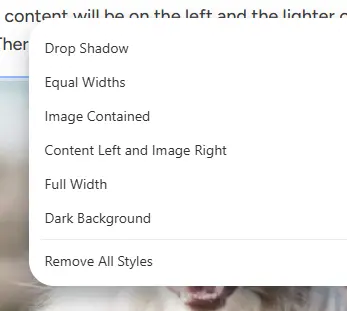
Below in the titles of each Featured Boxed Item are the options used to style the snippet.

Featured Boxed Item - Full Width, Equal Width, Dark Background
Lorem ipsum dolor sit amet, consectetur adipiscing elit, sed do eiusmod tempor incididunt ut labore et dolore magna aliqua. Ut enim ad minim veniam, quis nostrud exercitation ullamco laboris nisi ut aliquip ex ea commodo consequat.
Learn More
Featured Boxed Item - Full Width, Equal Width, Image to Right
Lorem ipsum dolor sit amet, consectetur adipiscing elit, sed do eiusmod tempor incididunt ut labore et dolore magna aliqua. Ut enim ad minim veniam, quis nostrud exercitation ullamco laboris nisi ut aliquip ex ea commodo consequat.
Learn More
Large Centered Image
Lorem ipsum dolor sit amet, consectetur adipiscing elit. Phasellus iaculis pretium dapibus. Ut vulputate est quis dui molestie, sed venenatis risus blandit. Maecenas in dolor eget dolor vulputate condimentum. Aliquam tellus purus, molestie at condimentum ac, facilisis at massa. Phasellus in libero a nisi pretium luctus. Morbi hendrerit erat felis, vitae egestas.
Text / Image Split (Image Right)
Lorem ipsum dolor sit amet, consectetur adipiscing elit. Phasellus iaculis pretium dapibus. Ut vulputate est quis dui molestie, sed venenatis risus blandit. Maecenas in dolor eget dolor vulputate condimentum. Aliquam tellus purus, molestie at condimentum ac, facilisis at massa. Phasellus in libero a nisi pretium luctus. Morbi hendrerit erat felis, vitae egestas.
Text / Image Split (Image Left)
Lorem ipsum dolor sit amet, consectetur adipiscing elit. Phasellus iaculis pretium dapibus. Ut vulputate est quis dui molestie, sed venenatis risus blandit. Maecenas in dolor eget dolor vulputate condimentum. Aliquam tellus purus, molestie at condimentum ac, facilisis at massa. Phasellus in libero a nisi pretium luctus. Morbi hendrerit erat felis, vitae egestas.
Text / Image Split (Image Left)
Lorem ipsum dolor sit amet, consectetur adipiscing elit. Phasellus iaculis pretium dapibus. Ut vulputate est quis dui molestie, sed venenatis risus blandit. Maecenas in dolor eget dolor vulputate condimentum. Aliquam tellus purus, molestie at condimentum ac, facilisis at massa. Phasellus in libero a nisi pretium luctus. Morbi hendrerit erat felis, vitae egestas.
Text / Image Split (Image Left)
Lorem ipsum dolor sit amet, consectetur adipiscing elit. Phasellus iaculis pretium dapibus. Ut vulputate est quis dui molestie, sed venenatis risus blandit. Maecenas in dolor eget dolor vulputate condimentum. Aliquam tellus purus, molestie at condimentum ac, facilisis at massa. Phasellus in libero a nisi pretium luctus. Morbi hendrerit erat felis, vitae egestas.
Featured Boxed Item - Image Contained
Add by clicking on the + icon and then select Snippet. Choose Featured Box Item.
By default the content will be on the left and the lighter color. The content panel's properties may be changed by clicking on the snippet and then clicking on the feather icon. There will be a selection of options to choose from and mix and match.
Below in the titles of each Featured Boxed Item are the options used to style the snippet.
Featured Boxed Item - Full Width, Image Contained
Lorem ipsum dolor sit amet, consectetur adipiscing elit, sed do eiusmod tempor incididunt ut labore et dolore magna aliqua. Ut enim ad minim veniam, quis nostrud exercitation ullamco laboris nisi ut aliquip ex ea commodo consequat.
Learn More
Featured Boxed Item - Full Width, Image Contained, Dark Background
Lorem ipsum dolor sit amet, consectetur adipiscing elit, sed do eiusmod tempor incididunt ut labore et dolore magna aliqua. Ut enim ad minim veniam, quis nostrud exercitation ullamco laboris nisi ut aliquip ex ea commodo consequat.
Learn More
Featured Boxed Item
Add by clicking on the + icon and then select Snippet. Choose Featured Box Item.
By default the content will be on the left and the lighter color and will look like what is below. The content panel's properties may be changed by clicking on the snippet and then clicking on the feather icon. There will be a selection of options to choose from and mix and match.
Below in the titles of each Featured Boxed Item are the options used to style the snippet.
Featured Boxed Item
Lorem ipsum dolor sit amet, consectetur adipiscing elit, sed do eiusmod tempor incididunt ut labore et dolore magna aliqua. Ut enim ad minim veniam, quis nostrud exercitation ullamco laboris nisi ut aliquip ex ea commodo consequat.
Learn More
Featured Boxed Item
Lorem ipsum dolor sit amet, consectetur adipiscing elit, sed do eiusmod tempor incididunt ut labore et dolore magna aliqua. Ut enim ad minim veniam, quis nostrud exercitation ullamco laboris nisi ut aliquip ex ea commodo consequat.
Learn More
Featured Boxed Item - Dark Background
Lorem ipsum dolor sit amet, consectetur adipiscing elit, sed do eiusmod tempor incididunt ut labore et dolore magna aliqua. Ut enim ad minim veniam, quis nostrud exercitation ullamco laboris nisi ut aliquip ex ea commodo consequat.
Learn More
Image Content Banner
Add by clicking on the + icon and then select Snippet. Choose Image Content Banner.
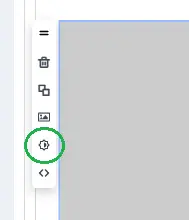
By default the content will be on the left and the lighter color. The content panel's position may be changed by clicking on the snippet and then click the feather icon and select Move Content Right. The color of the panel maybe changed by clicking on the snippet and toggle the Light/Dark icon.
Below in the titles of each Image Content Banner are the options used to style the snippet.

Image Content Banner - Content on Right
Lorem ipsum door sit amet, consectetur adipiscing elit, sed do eiusmod tmepor incididunt ut labore et dolore magna aliqua. Diam sit amet nisl suscipit adipiscing bibendum est ultricies integer. Aliquet nec ullamcorper sit amet risus. Amet consectetur adipiscing elit ut.
Learn More
Image Content Banner
Lorem ipsum door sit amet, consectetur adipiscing elit, sed do eiusmod tmepor incididunt ut labore et dolore magna aliqua. Diam sit amet nisl suscipit adipiscing bibendum est ultricies integer. Aliquet nec ullamcorper sit amet risus. Amet consectetur adipiscing elit ut.
Learn More
Rotating Feature Area
The Title of a Featured Item
Lorem ipsum dolor sit amet consectetur adipiscing elit. Quisque hendrerit urna sem et placerat magna.
Learn More

The Title of a Featured Item
Lorem ipsum dolor sit amet, consect etur adipiscing elit. Cras eu sagittis purus, in varius lectus ut vel.
Learn More

The Title of a Featured Item
Lorem ipsum dolor sit amet consectetur adipiscing elit. Quisque hendrerit urna sem et placerat magna.
Learn More
Image Callout
Add by clicking on the + icon and then select Snippet. Choose Image Callout.
To update the image, click on the snippet to select it. A menu will display with some options. Select the one that looks like an image icon. Select or upload an image and follow the directions in the image panel.
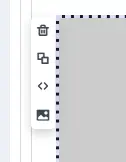
Image Callout
Lorem ipsum dolor sit amet consectetur adipiscing elit. Quisque hendrerit urna sem et placerat magna.
Learn More
Image Callout
Lorem ipsum dolor sit amet consectetur adipiscing elit. Quisque hendrerit urna sem et placerat magna.
Learn More